Page motion controls are preparing. All page content is already available.

The connected export workspace

From first buyer.
To the next deal.

Find international buyers. Turn conversations into considered offers, professional documents and lasting customer relationships — in one export workspace.

No card required. Nothing searches or sends on signup.

An illustration of buyer evidence and a business profile flowing into a buyer workspace, then into a reviewed email draft and a draft invoice.

Illustrative workflow · No search or email is run

Scene controls are getting ready. The complete final illustration is shown.

EXPORT CRM, BUILT AROUND THE BUYER

For manufacturers, traders and export teams.
From scattered tools to a connected next step.

See the work, from start to next

Find the opportunity.
Build the relationship.

One connected workspace for the work around every buyer. Follow the journey, or choose a step to see it in action.

01Discovery & outreach

Your next conversation starts with the right company.

Turn a product and a market into a shortlist you can investigate. Keep the useful context when you reach out.

Explore discovery & outreach
  1. Search with a purpose

    Discover relevant company websites. Check the products, contact details and source evidence before choosing a lead.

  2. Bring the evidence into CRM

    Promote a reviewed company into your buyer workspace. Keep the contact, notes and verification depth together.

  3. Make the introduction personal

    Draft in Email Studio, then prepare an Outreach Pack with your follow-up messages and wait intervals. Review before activation.

ExportPilot
Buyer discovery & outreachSports-goods enquiry illustrative

Buyer Search

Find Buyers

01

Start with a product category and market, then inspect the evidence behind each result.

Buyer typeSourceRelevanceContact evidence
Sports-goods distributorWholesale and regional supplyPublic company websiteStrong matchPurchasing role found
Specialist retailerTeam and training equipmentPublic company websiteRelevantBusiness contact page

Sources stay visible so you can review before saving anything.

Lead review

Inspect the buyer record

02

Open a result, check the public-source contact depth, and decide whether it belongs in your CRM.

Search results Sports goods · Germany

Sports-goods distributorReviewed result
Specialist retailerReview pending

Email Studio

Prepare a personal introduction

03

Bring the reviewed buyer and product context into a draft, then review the follow-up timing before activation.

Message draftNot sent
ToReviewed purchasing contact
SubjectSports-goods supply enquiry for Germany

Hello,

I’m reaching out about sports-goods supply for the German market. Your public wholesale range appears relevant to the products we are preparing.

Could you point me to the right person for a purchasing conversation?

Regards,
Your business team

Illustrative product preview · actions stay in your control

Scroll to follow the workflow. Choose a step to take a closer look.Scroll through each step, or choose a step to jump to its preview.

A buyer replies. Bring the conversation into the next step.
02Negotiation & pricing

A better response starts with context. And the right numbers.

Use AI Negotiator to think through a reply, then check what the deal means for your business before agreeing to it.

Explore negotiation & calculators
  1. Understand what the buyer needs

    Bring the buyer’s message and your product details to the Negotiator for a suggested approach.

  2. Keep the decision in your hands

    Use a suggestion as a working draft. Review quantities, lead times and payment terms in Commercial Terms.

  3. Know the profit before the offer

    Compare cost, selling price, quantity and additional costs in the calculators. Use your own assumptions before preparing a proforma.

ExportPilot
Negotiation & pricingSports-goods enquiry illustrative

Buyer conversation

Understand the reply

01

Keep the buyer’s words in view while AI Negotiator identifies what needs a human decision.

Sports-goods enquiryBuyer conversation · illustrative
“Can we discuss pricing, quantities and delivery terms?”
Reply received · awaiting your review

Working response

Draft terms without committing

02

Turn the identified questions into a clear response and keep every commercial field visibly unreviewed.

Response draftReview required

Hello,

Thank you for your reply. We can prepare pricing once we confirm the requested quantity, delivery destination, and target delivery window.

I’ve set out the current working assumptions alongside this message. Please confirm or amend them.

Suggested language · editable before use

Pricing check

Profit Margin Calculator

03

Test the current assumptions before you prepare a quote or proforma invoice.

Cost per unit
USD20.00
Selling price
USD25.00
Quantity
1
Additional costs
USD0.00
Tax
0%

Illustrative calculation Not an approved quote

Profit$5.00Margin20%
Cost · 80%Profit · 20%

Replace these assumptions with your actual costs and terms.

Illustrative product preview · actions stay in your control

Scroll to follow the workflow. Choose a step to take a closer look.Scroll through each step, or choose a step to jump to its preview.

Reviewed terms give you a starting point for the order documents.

03Customers & orders

One buyer relationship. All the work that comes after.

Continue from the buyer workspace into professional invoices, export documents and the practical details of fulfilment.

Explore documents & operations
  1. Start with the buyer you already know

    Link the buyer, add products and terms, then preview a proforma or invoice before sharing it. Prepare the supporting export documents.

  2. Get the document ready to use

    Open the file in PDF Studio, make the needed edits and download it. Saving and sending remain separate actions.

  3. Keep documents with the shipment

    Link the document set to a shipment record. Record dated milestones and notes as the order moves forward.

ExportPilot
Documents & operationsSports-goods enquiry illustrative

Invoices

Prepare a buyer-linked proforma

01

Create a professional draft from the relationship and working commercial terms.

Your business
PROFORMA INVOICEDRAFT

BILL TOSelected buyerSports-goods enquiry

CURRENCYUSDIllustrative values

ProductQtyUnit priceTotal
Sports goods1$25.00$25.00
Proforma total$25.00 USD
Review business, buyer, product, tax, and delivery details before sharing.

PDF Studio

Make the document ready to review

02

Open the same proforma, add a clear annotation, and download only when the document is ready.

PagesAdd textAnnotate100%Download for review
Your business
PROFORMA INVOICEDRAFT

BILL TOSelected buyerSports-goods enquiry

TOTAL$25.00 USD

ProductQtyTotal
Sports goods1$25.00
Delivery terms to confirm

Download creates a review copy. Sending remains a separate controlled action.

Shipments

Keep fulfilment records connected

03

Link the order documents and record dated milestones manually as the work progresses.

Shipment recordSports-goods enquiry
Manual record
Linked documents
Proforma invoiceDraft · $25.00 USD
Packing listDraft · linked to this shipment
Milestones
  1. Record created12 Sep 2026 · entered manually
  2. Documents prepared14 Sep 2026 · entered manually
  3. Dispatch dateAwaiting manual update

Milestones are your workspace record, not live carrier tracking.

Illustrative product preview · actions stay in your control

Scroll to follow the workflow. Choose a step to take a closer look.Scroll through each step, or choose a step to jump to its preview.

The order is one chapter in a longer customer relationship.

04Newsletters & relationships

Stay familiar between orders.

Share useful updates and new products with customers who opted in. Give the next conversation somewhere to begin.

Explore newsletters & email marketing
  1. Start with permission

    Choose a relevant subscriber list. A CRM contact is not automatically subscribed to a newsletter.

  2. Make the update worth opening

    Use your business branding, reusable header and footer, and a useful message to introduce products or share practical advice.

  3. Choose the message and the moment

    Preview the audience, sender and content. Keep unsubscribe details in place, then choose when to send or schedule.

ExportPilot
Newsletters & relationshipsSports-goods enquiry illustrative

Subscribers

Choose a permission-based audience

01

Start from an opt-in subscriber list and keep CRM relationships separate from marketing consent.

Subscriber listProduct updates · opted in
Consent recorded
RelationshipSubscriptionConsent sourcePreference
Sports-goods enquiryIllustrative contactOpted inSubscriber formProduct updates

CRM contacts are not auto-enrolled.Only contacts with recorded marketing consent belong in this list.

Newsletter Composer

Build a useful customer update

02

Choose your branding, write the subject and message, then preview the newsletter with its unsubscribe footer.

Your business
PRODUCT UPDATE
FOR OUR CUSTOMERS
New sports-goods options for the season ahead.

A concise update on the range, ordering considerations, and the questions our team can help answer.

Built around practical buying decisionsAsk about product fit, quantities, availability, and delivery planning.

Your business contact detailsManage preferences or unsubscribe

Campaign review

Review the audience and message

03

Confirm consent, sender details, content, and timing before choosing to send now or schedule.

Pre-send review
  • AudienceOpt-in product-update list selected

  • MessageSubject, preview, and content reviewed

  • Required footerSender details and unsubscribe remain in place

Campaign stateDraft · no send recorded

Choose only after the review is complete.

Send now previewSchedule preview
Actual sends remain subject to consent, suppression, and account send controls.

Illustrative product preview · actions stay in your control

Scroll to follow the workflow. Choose a step to take a closer look.Scroll through each step, or choose a step to jump to its preview.

Keep existing customers informed while new buyers discover your business.

05Website & content

Turn your expertise into a reason to find you.

Prepare useful, search-friendly articles in Blog Creator. Connect an eligible WordPress site to continue the content workflow.

Explore website & content workflows
  1. Bring your website into the workflow

    Add and test a WordPress connection when publishing is enabled for your workspace.

  2. Answer a real buyer’s question

    Choose a useful topic, add source facts and review the draft. Build clear headings and content your next buyer can use.

  3. Make it ready for your website

    Review the title and meta description. Export, or send as a WordPress draft. Publishing and topic schedules require an enabled, configured connection and eligible access.

ExportPilot
Website & contentSports-goods enquiry illustrative

Connect WordPress

Check website readiness

01

Connect a website only when the workspace is eligible and the owner has the required WordPress access.

ExportPilotContent workspace

Your WordPress siteConnection not configured

Connection readiness

Eligible workspace accessConfirm the feature is available to this workspace

Check

Website ownershipUse access approved by the site owner

Check

Connection testVerify the configured site before creating drafts

Not run

Check the connection before sending an article to your website.

Blog Creator

Write a useful buyer guide

02

Develop the article around practical questions, then review every factual source before using the draft.

Body (Markdown)PreviewDraft

ARTICLE TITLE

Choosing a sports-goods supplier

Selecting a supplier starts with product fit, reliable information, and commercial terms you can compare.

Start with the product requirement

Document the intended use, quantity range, destination, and standards that apply before comparing suppliers.

Review evidence and working terms

Check public product information, confirm assumptions directly, and record which details still need verification.

SEO & publishing

Prepare a discoverable draft

03

Review the search preview, then export or send a draft only through an enabled, configured connection.

Search appearance
SEO title
Choosing a sports-goods supplier | Your business
Meta description
A practical guide to product requirements, supplier evidence, and commercial terms.
Your connected websiteChoosing a sports-goods supplier

A practical guide to product requirements, supplier evidence, and commercial terms.

Illustrative product preview · actions stay in your control

Scroll to follow the workflow. Choose a step to take a closer look.Scroll through each step, or choose a step to jump to its preview.

A new enquiry brings you back to the buyer conversation.

Back to discovery

From agreement to paperwork

Real work.
Professional documents.

Give a buyer a clear offer, prepare the invoice, and keep the supporting paperwork close to the order. Start from your business details and the buyer you selected.

Documents you can create9 templates
  • Proforma Invoice

    Prepare a quotation or price offer in invoice form.

  • Commercial Invoice

    Itemize the goods, price and payment terms.

  • Packing List

    List packages, quantities, dimensions and weights.

  • Certificate of Origin

    Prepare origin details for the required review.

  • Bill of Lading

    Prepare shipping particulars for carrier review.

  • Shipping Declaration

    Record the shipment’s export particulars.

  • Quality / Inspection Certificate

    Document the inspection details you can support.

  • Shipper's / Beneficiary Declaration

    Prepare the shipper’s goods and transport details.

  • LC Document Checklist

    Work through letter-of-credit document requirements.

These are editable document templates. Required chamber certification, carrier issuance and destination-specific checks remain separate.

The context travels with you
SELECTED BUYERCompany & contact detailsReview the recipient and commercial terms
Link documents to a shipmentRecord actual dates and milestones

Check the economics. Review cost and margin assumptions before preparing an offer.

Finish the PDF. Fill forms, add signatures, annotate, merge or split with the available PDF tools.

Explore documents and PDFs

A closer look

See the actual workspace.

Look inside the actual product. Open any HD preview to inspect it, or follow the guide from the first search to the next customer conversation.

CRM & buyer workspace
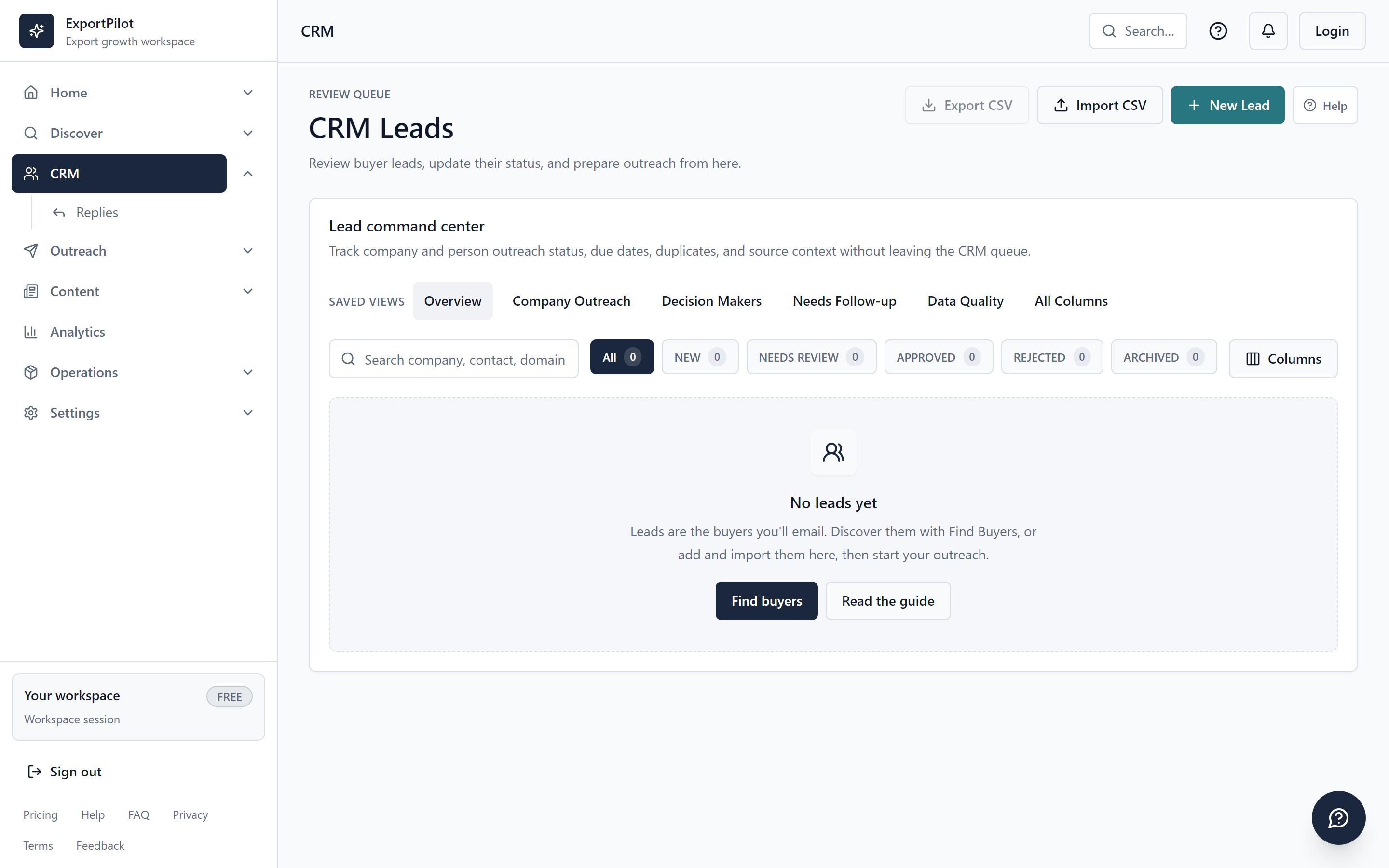
CRM Leads workspace showing filters, lead actions and an empty workspace in a local demoInspect the interface HD
Actual interface · Local demo, not customer results

CRM & buyer workspace

Actual interface · Local demo · 2880 × 1800

Open original

Choose “Zoom to read” to inspect small details. Swipe, scroll or use the arrow keys to pan. Escape closes the preview.

See how this workflow works
Email Studio & Business Brain
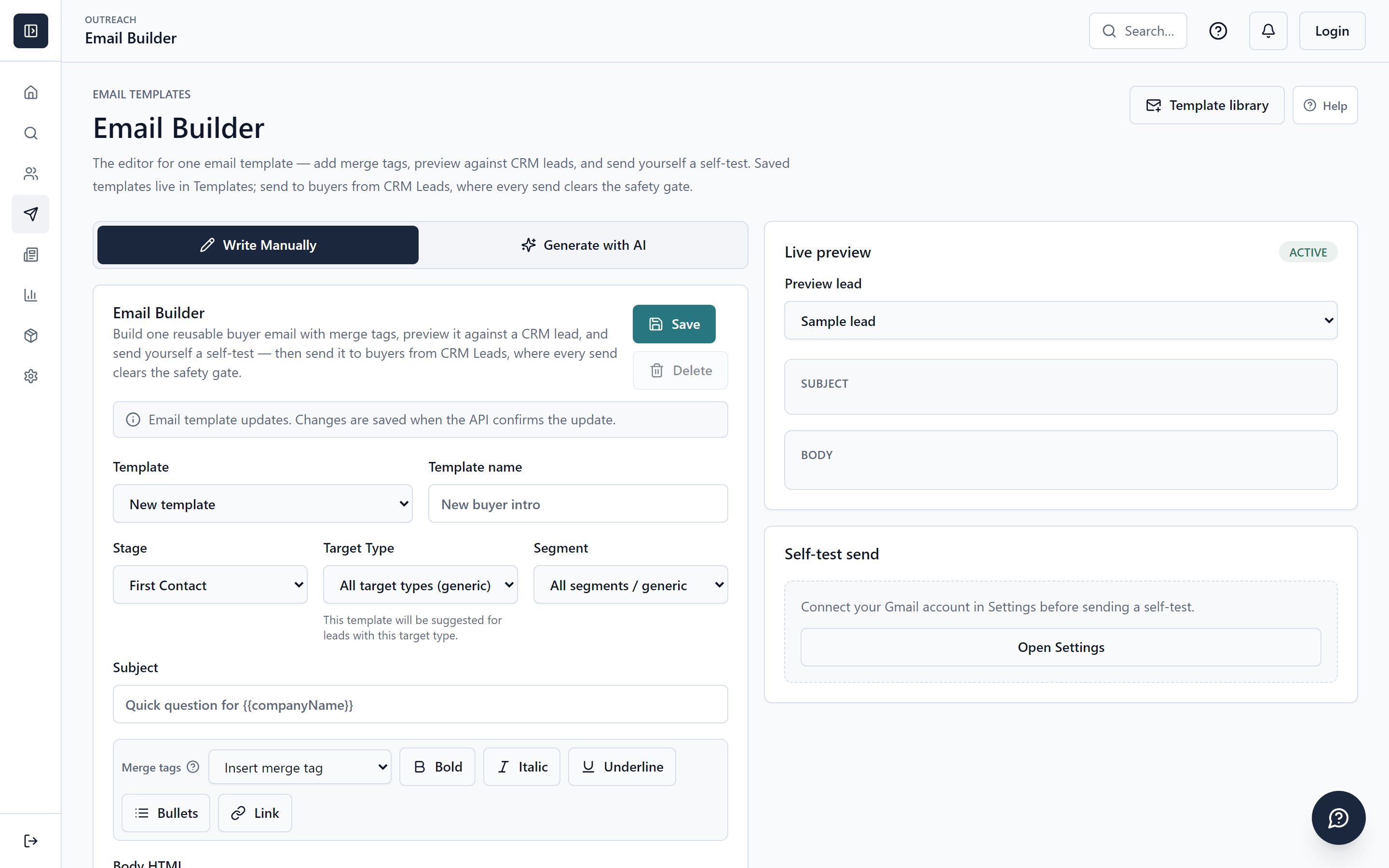
Email Studio template workspace in a local demo with controls for creating and reviewing email draftsInspect the interface HD
Actual interface · Local demo, not customer results

Email Studio & Business Brain

Actual interface · Local demo · 2880 × 1800

Open original

Choose “Zoom to read” to inspect small details. Swipe, scroll or use the arrow keys to pan. Escape closes the preview.

See how this workflow works
Read the complete product guide

Compare the work. Then the cost.

Several subscriptions.
Or a connected starting point.

A researched example of five paid tools for prospecting, newsletters and document work. Compare their specialist strengths with the everyday export workflows in ExportPilot.

USD · monthly billingOne person, one business. Listed tiers and capacities below; taxes, overages and add-ons excluded.

An example paid stack

5 subscriptions
  • Apollo Basic

    Prospecting & outreach

    1 seat · 2,500 credits/month
    $65.00/ month
  • Mailchimp Essentials

    Newsletter marketing

    500 contacts · standard rate after promotions
    $13.00/ month
  • Zoho Books Standard

    Invoices & quotes

    US edition · 1 organization · 3 users included
    $20.00/ month
  • Adobe Acrobat Standard

    PDF preparation

    Individual license · monthly, no annual commitment
    $24.99/ month
  • GetGenie Starter

    WordPress content

    1 subscription · 20,000 AI words/month
    $9.99/ month
Combined subscription price$132.98 / month
ExportPilot Growth

Keep the buyer.
Connect the work.

$48.99 / month

Plus calculators and manual shipment records, kept beside the commercial work.

$83.99 less / monthSubscription price difference in this example.

Different products and allowances. This is a price comparison, not a promise to replace every specialist capability. Provider and usage costs can apply.

Compare ExportPilot plans
What matches, what differs & how we calculated it

Selection basis. A paid prospecting/outreach plan, a 500-contact newsletter plan, an entry paid accounting plan, an individual PDF plan and a WordPress writing plan. Apollo already has sales tools, so a second CRM subscription is not added. These are examples, not a required or cheapest stack; several vendors also offer Free plans.

Apollo → ExportPilot

Public company discovery, CRM leads and reviewed email sequences.

Apollo includes a proprietary contact database and sales tooling. ExportPilot researches public websites; it does not provide Apollo’s database.

Mailchimp → ExportPilot

Opt-in subscriber lists, newsletter creation and reviewed campaigns.

Mailchimp has its own contact-based pricing and marketing features. Audience capacity, templates and automation depth differ.

Zoho Books → ExportPilot

Buyer-linked invoices, proformas and nine export document templates.

Zoho Books is an accounting product, including bank feeds and financial reporting. ExportPilot’s commercial documents do not replace an accounting ledger.

Adobe Acrobat → ExportPilot

PDF assembly, annotations, form filling and signature placement.

Acrobat offers broader editing, conversion and signature-request workflows. ExportPilot does not replace Acrobat’s full PDF editor or tracked e-signature service.

GetGenie → ExportPilot

Article drafts, title and meta-description review, and a configured WordPress connection.

GetGenie also includes keyword and SEO research tools. ExportPilot’s content workflow has different AI limits and is not a specialist SEO suite. Publishing requires eligible, enabled access.

The calculation. $65.00 + $13.00 + $20.00 + $24.99 + $9.99 = $132.98 per month. Compare with Growth at $48.99 per month. The difference is conditional on choosing these exact subscriptions; actual savings depend on the tools you need. US list prices or USD monthly selectors were used, without annual discounts or introductory offers. Hosting, mailboxes, provider usage, taxes and overages are outside this subscription-only comparison.

Prices checked . Each price links to its official source. Brands belong to their owners; no affiliation or endorsement is implied.

Start smaller: Free includes 25 saved CRM leads and 3 invoices/month. Try a first workflow

A clear place to start

Find your starting point.
Leave room to grow.

Four plans for the same practical direction: find buyers and move the work forward. Start with the Free allowances, then compare capacity as your needs grow.

Your first workflow

Free

$0USD / month

Try a small buyer-to-invoice workflow.

  • 25 CRM leads
  • 50 search credits/month
  • 15 AI actions/month
  • 3 invoices/month
Start Free

Build a routine

Starter

$22.99USD / month

Add recurring research and newsletter lists.

  • 250 CRM leads
  • 500 search credits/month
  • 150 AI actions/month
  • Unlimited invoices/month
Explore Starter

More active opportunities

Growth

$48.99USD / month

Make room for more buyers and campaigns.

  • 1,000 CRM leads
  • 1,000 search credits/month
  • 1,000 AI actions/month
  • Unlimited invoices/month
Explore Growth

A larger workspace

Pro

$78.99USD / month

Expand your lead library and AI allowance.

  • Unlimited CRM leads
  • 1,500 search credits/month
  • 10,000 AI actions/month
  • Unlimited invoices/month
Explore Pro

Allowance detail

Compare the everyday capacity.

Scroll sideways to compare on a smaller screen.

Monthly plans and practical usage limits
Included capacityFreeStarterGrowthPro
Buyer discovery & workspace
CRM leads252501,000Unlimited
Search credits / month505001,0001,500
Company profiles / month20500UnlimitedUnlimited
Commercial workflow
AI actions / month151501,00010,000
Invoices / month3UnlimitedUnlimitedUnlimited
Scheduled searchesNot included135
Publishing & audience
Newsletter listsNot included210Unlimited
Newsletter subscribersNot included2,00010,000Unlimited
Blog schedulesNot included135

Billed in USD. Monthly allowances reset each month; CRM limits apply to saved leads. Paid upgrades are support-assisted. Plan allowances do not guarantee results or activate providers. Sending remains subject to safety checks, warmup and daily caps. WordPress and scheduled features require their own setup. Billing shows your active plan and any granted trial end date; a trial does not automatically charge you.

See all limits, billing periods and upgrade details

A clear place to begin

Your product.
Your next market.

Bring what you know about your business. Build a considered next step around it.

  1. 01

    Make it your workspace

    Create your account, confirm your email and check your plan in Billing.

  2. 02

    Start with your business facts

    Add your products, specifications and company details. Smart Setup suggests a starting point for you to review.

  3. 03

    Choose a useful first action

    Research a market or prepare a draft. Connect a supported mailbox when you are ready to send.

Set up your workspace
Smart SetupWorkflow preview

Your product & company

The facts behind every introduction.

Product categorySpecificationsCapacity & company details

A market to explore

Choose the country and the kind of buyer.

Target countryBuyer type

A starting point. Yours to review.

Check the suggested direction, then begin buyer research or prepare your first introduction.

You review before taking the next step

Illustrated workflow. Setup does not start a search or send an email.

Questions before you join

Know what
comes next.

Honest answers about data, permissions and setup.

Read all FAQs
What is ExportPilot?

ExportPilot is an export CRM and buyer-discovery workspace for manufacturers, traders and exporters. It connects company research, reviewed outreach, follow-ups, invoices, export documents and shipment records. Opt-in newsletters and website content help you continue customer relationships and attract new inquiries.

Can I use it to find international buyers?

You can search for potential companies by product and market, inspect public website evidence and save relevant leads. A result is a research starting point, not a guarantee that a company is buying or has a reachable decision-maker.

What happens when contact details are missing?

Not every business publishes a direct contact. ExportPilot keeps missing facts unknown. Review the website, refine your targeting or keep the lead for further research; never replace a missing email with a guess.

Does the AI send emails automatically?

Generating a draft does not send it. Review the draft, recipient and facts first. Separately configured outreach follow-ups or campaign schedules can send later, subject to sending limits and safety checks. Nothing is sent just because you sign up.

Are cold outreach and newsletters the same audience?

No. A CRM contact is not automatically a newsletter subscriber. Newsletter campaigns require the appropriate opt-in permission; cold outreach has a separate review and eligibility flow. Both use sending safety checks.

What does the Free plan include?

Free includes 25 CRM leads, 50 search credits per month, 15 AI actions per month and 3 invoices per month. No card is required. Billing shows your active plan and any granted trial end date. Paid upgrades are support-assisted; there is no automatic paid charge when a trial ends.

Which documents can I prepare?

The document workspace includes 9 templates: Packing List, Certificate of Origin, Shipping Declaration, Proforma Invoice, Commercial Invoice, Quality / Inspection Certificate, Bill of Lading, Shipper's / Beneficiary Declaration, LC Document Checklist. A proforma invoice can serve as a quotation in invoice form. Required official certification and carrier issuance remain separate.

Do I need to connect every tool before starting?

Start by adding business context, researching a market or preparing an invoice. Connect a sending mailbox when you are ready for outreach. Newsletter audiences need opt-in permission, and WordPress publishing needs its own enabled connection. You can build the workflow one useful step at a time.

Will it work with my mailbox and website?

Sending needs a supported mailbox connected in Settings. Incoming reply sync is a separate supported connection. WordPress publishing, digest delivery and other provider-backed actions depend on setup and availability; check their readiness before relying on them.

The next step is yours

Your next buyer.
Your next chapter.

Start with research. Keep the evidence. Make the decision yours.

Create your free account